than for instance .html pages.
People talk about trusted domains but they don’t mention (or don’t think) some parts of the domain can be trusted less. Google treats some subfolders….. differently. Well, they used to – and remembering how Google used to handle things has some benefits – even in 2012.
Some say don’t go beyond 4 levels of folders in your file path. I haven’t experienced too many issues, but you never know.
UPDATED – I think in 2012 it’s even less of something to worry about. There’s so much more important elements to check.
Which Is Better For Google? PHP, HTML or ASP?
Google doesn’t care. As long as it renders as a browser compatible document, it appears Google can read it these days.
I prefer php these days even with flat documents as it is easir to add server side code to that document if I want to add some sort of function to the site.
Does W3C Valid HTML / CSS Help SEO?
Above – Google Confirming this 2008 blog post advice.
Does Google rank a page higher because of valid code? The short answer is no, even though I tested it on a small scale test with different results.
Google doesn’t care if your page is valid html and valid css. This is clear – check any top ten results in Google and you will probably see that most contain invalid HTML or CSS. I love creating accessible websites but they are a bit of a pain to manage when you have multiple authors or developers on a site.
If your site is so badly designed with a lot of invalid code even Google and browsers cannot read it, then you have a problem.
Where possible, if commissioning a new website, demand at least minimum accessibility compliance on a site (there are three levels of priority to meet), and aim for valid html and css. Actually this is the law in some countries although you would not know it, and be prepared to put a bit of work in to keep your rating.
Valid HTML and CSS are a pillar of best practice website optimisation, not strictly search engine optimisation (SEO). It is one form of optimisation Google will not penalise you for.
Where can you test the accessibility of your website – Cynthia Says – http://www.contentquality.com/ – not for the faint hearted!

Addition – I will be following W3C recommendations that actually help seo;
Hypertext links. Use text that makes sense when read out of context. W3C Top Ten Accessibility Tips
301 Old Pages
I’ve not got any proof this actually happens, but I do it. Rather than tell Google via a 404 or some other command that this page isn’t here any more, I have no problem permanently redirecting a page to a relatively similar page to pool any link power that page might have.
My general rule of thumb is to make sure the information (and keywords) are contained in the new page – stay on the safe side.
Most already know the power of a 301 and how you can use it to power even totally unrelated pages to the top of Google for a time – sometimes a very long time.
Google seems to think server side redirects are OK – so I use them.
You can change the focus of a redirect but that’s a bit black hat for me and can be abused – I don’t really talk about that sort of thing on this blog. But it’s worth knowing – you need to keep these redirects in place in your htaccess file.
Redirecting multiple old pages to one new page – works for me, if the information is there on the new page that ranked the old page.
NOTE – This tactic is being heavily spammed in 2013. Be careful with redirects. I think I have seen penalties transferred via 301s. I also WOULDN’T REDIRECT 301s blindly to your home page. I’d also be careful of redirecting lots of low quality links to one url. If you need a page to redirect old urls to, consider your sitemap or contact page. Audit any pages backlinks BEFORE you redirect them to an important page.
Penalty For Duplicate Content On-Site?
I am always on the look for duplicate content issues. I think I have seen -50 positions for nothing more than a lot of duplicate content although I am looking into other possible issues. Generally speaking, Google will identify the best pages on your site if you have a decent on-site architecture. It’s usually pretty decent at this but it totally depends on where you are linkbuilding to within the site and how your site navigation is put together.
Don’t invite duplicate content issues. I don’t consider it a penalty you receive in general for duplicate content – you’re just not getting the most benefit. You’re website content isn’t being what it could be – a contender.
But this should be common sense. Google wants and rewards original content. Google doesn’t like duplicate content, and it’s a footprint of most spam sites. You don’t want to look anything like a spam site.
The more you can make it look a human built every page on a page by page basis with content that doesn’t appear exactly in other areas of the site – the more Google will like it. Google does not like automation when it comes to building a website, that’s for clear. (Unique titles, meta descriptions, keyword tags, content.)
I don’t mind Category duplicate content – as with WordPress – it can even help sometimes to spread PR and theme a site. But I generally wouldn’t have tags and categories, for instance.
I’m not that bothered with ‘themeing’ at this point to recommend silo’ing your content or no-indexing your categories. If I am not theming enough with proper content and mini-silo’ing to related pages from this page and to this page I should go home. Most sites in my opinion don’t need to silo their content – the scope of the content is just not that broad.
Keep in mind Google won’t thank you for spidering a calendar folder with 10,000 blank pages on it – why would they. They may even algorythmically tick you off.
PS – Duplicate content found on other sites? Now that’s a totally diferent problem.
UPDATED: See Google Advice on Duplicate Content.
Broken Links Are A Waste Of Link Power
The best piece of advice I ever read about creating a website / optimising a website was years ago:
make sure all your pages link to at least one other in your site
This advice is still sound today and the most important piece of advice out there in my opinion. Yes it’s so simple it’s stupid.
Check your pages for broken links. Seriously, broken links are a waste of link power and could hurt your site, drastically in some cases. Google is a link based search engine – if your links are broken and your site is chock full of 404s you might not be at the races.
Here’s the second best piece of advice in my opinion seeing as we are just about talking about website architecture;
link to your important pages often internally, with varying anchor text in the navigation and in page text content
…. especially if you do not have a lot of Pagerank to begin with!
Do I Need A Google XML Sitemap For My Website?
What is a xml sitemap and do I need one to ‘seo’ my site for Google?
(The XML Sitemap protocol) has wide adoption, including support from Google, Yahoo!, and Microsoft
No. You do not need a XML Sitemap to optimise a site for Google, again, if you have a sensible navigation system.
A XML Sitemap is a method by which you can help a search engine, including Google, find & index all the pages on your site. Sometimes useful for very large sites, perhaps if the content chases often, but still not necessary if you have a good navigation system.
Make sure all your pages link to at least one other in your site
Link to your important pages often, with varying anchor text, in the navigation and in page text content
Remember Google needs links to find all the pages on your site.
Sitemaps are an easy way for webmasters to inform search engines about pages on their sites that are available for crawling. In its simplest form, a Sitemap is an XML file that lists URLs for a site along with additional metadata about each URL (when it was last updated, how often it usually changes, and how important it is, relative to other URLs in the site) so that search engines can more intelligently crawl the site.
I don’t use xml sitemaps that much at all, as I am confident I can get all my pages indexed via links on the website and via RSS feed if I am blogging. I would however suggest you use a ‘website’ sitemap – a list of the important pages on your site.
Some CMS can auto-generate xml sitemaps, and Google does ask you submit a site map in webmaster tools, but I still don’t. If you want to find out more go tohttp://www.sitemaps.org/
I prefer to manually define my important pages by links, and ‘old – style’ getting my pages indexed via links from other websites. I also recognise not all websites are the same.
You can make a xml site online at http://www.xml-sitemaps.com/ if you decide they are for you.
I’m certainly no authority on sitemaps – perhaps anyone else with any experience of them can add something…?
Does Only The First Link Count In Google?
Does the second anchor text link on a page count?
One of the more interesting discussions in the seo community of late has been trying to determine which links Google counts as links on pages on your site. Some say the link Google finds higher in the code, is the link Google will ‘count’, if there are two links on a page going to the same page.
Update – I tested this recently with the post Google Counts The First Internal Link.
For example (and I am talking internal here – if you took a page and I placed two links on it, both going to the same page? (OK – hardly scientific, but you should get the idea). Will Google only ‘count’ the first link? Or will it read the anchor txt of both links, and give my page the benefit of the text in both links especially if the anchor text is different in both links? Will Google ignore the second link?
What is interesting to me is that knowing this leaves you with a question. If your navigation aray has your main pages linked to in it, perhaps your links in content are being ignored, or at least, not valued.
I think links in body text are invaluable. Does that mean placing the navigation below the copy to get a wide and varied internal anchor text to a page?
Perhaps.
Here’s some more on the topic;
You May Be Screwing Yourself With Hyperlinked Headers
Single Source Page Link Test Using Multiple Links With Varying Anchor Text
Results of Google Experimentation – Only the First Anchor Text Counts
Debunked: Only The 1st Anchor Text Counts With Google
Google counting only the first link to a domain – rebunked
As I said, I think this is one of the more interesting talks in seo at the moment and perhaps Google works differently with internal links as opposed to external; links to other websites.
I think quite possibly this could change day to day if Google pressed a button, but I optimise a site thinking that only the first link will count – based on what I monitor although I am testing this – and actually, I usually only link once from page to page on client sites, unless it’s useful for visitors.
Canonical Tag – Canonical Link Element Best Practice
Google SEO – Matt Cutts from Google shares tips on the new rel=”canonical” tag (more accurately – the canonical link element) that the 3 top search engines now support. Google, Yahoo!, and Microsoft have all agreed to work together in a
“joint effort to help reduce duplicate content for larger, more complex sites, and the result is the new Canonical Tag”.
Example Canonical Tag From Google Webmaster Central blog:<link rel="canonical" href="http://www.example.com/product.php?item=swedish-fish" />
You can put this link tag in the head section of the duplicate content urls, if you think you need it.
I add a self referring canonical link element as standard these days – to ANY web page.
Is rel=”canonical” a hint or a directive?
It’s a hint that we honor strongly. We’ll take your preference into account, in conjunction with other signals, when calculating the most relevant page to display in search results.
Can I use a relative path to specify the canonical, such as <link rel=”canonical” href=”product.php?item=swedish-fish” />?
Yes, relative paths are recognized as expected with the <link> tag. Also, if you include a<base> link in your document, relative paths will resolve according to the base URL.
Is it okay if the canonical is not an exact duplicate of the content?
We allow slight differences, e.g., in the sort order of a table of products. We also recognize that we may crawl the canonical and the duplicate pages at different points in time, so we may occasionally see different versions of your content. All of that is okay with us.
What if the rel=”canonical” returns a 404?
We’ll continue to index your content and use a heuristic to find a canonical, but we recommend that you specify existent URLs as canonicals.
What if the rel=”canonical” hasn’t yet been indexed?
Like all public content on the web, we strive to discover and crawl a designated canonical URL quickly. As soon as we index it, we’ll immediately reconsider the rel=”canonical” hint.
Can rel=”canonical” be a redirect?
Yes, you can specify a URL that redirects as a canonical URL. Google will then process the redirect as usual and try to index it.
What if I have contradictory rel=”canonical” designations?
Our algorithm is lenient: We can follow canonical chains, but we strongly recommend that you update links to point to a single canonical page to ensure optimal canonicalization results.
Can this link tag be used to suggest a canonical URL on a completely different domain?
**Update on 12/17/2009: The answer is yes! We now support a cross-domain rel=”canonical” link element.**
More reading
http://googlewebmastercentral.blogspot.co.uk/2009/02/specify-your-canonical.html
How To Implement Google Authorship Markup – What is Rel Author & Rel Me?
Google is piloting the display of author information in search results to help users discover great content. Google.
We’ve implemented Google Authorship Markup on the Hobo blog so my profile pic appears in Google search snippets. This helps draw attention to your search listing in Google, and may increase click-through rate for your listing. Many expect Authorship reputation to play a roles in rankings in the near future.
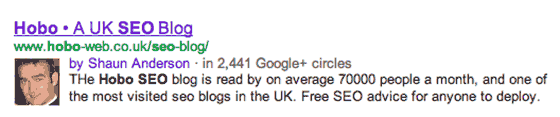
Google has released videos to help you get your face in Google serps.
If you have a Google profile (or Google Plus) you can implement these so that you can get a more eye-catching serp snippet in Google results (as we have, above):
and
Rich Snippets
Rich Snippets in Google enhance your search listing in Google search engine results pages. You can include reviews of your products or services, for instance. Rich Snippets help draw attention to your listing in serps. You’ve no doubt seen yellow stars in Google natural results listings, for instance.
What Not To Do In Search Engine Optimisation
Google has now released a search engine optimisation starter guide for webmasters, which they use internally:
Although this guide won’t tell you any secrets that’ll automatically rank your site first for queries in Google (sorry!), following the best practices outlined below will make it easier for search engines to both crawl and index your content. Google
Still worth a read even if it is fairly basic, generally accepted (in the industry) best practice search engine optimisation for your site.
Here’s a list of what Google tells you to avoid in the document;
choosing a title that has no relation to the content on the page
using default or vague titles like “Untitled” or “New Page 1″
using a single title tag across all of your site’s pages or a large group of pages
using extremely lengthy titles that are unhelpful to users
stuffing unneeded keywords in your title tags
writing a description meta tag that has no relation to the content on the page
using generic descriptions like “This is a webpage” or “Page about baseball
cards”
filling the description with only keywords
copy and pasting the entire content of the document into the description meta tag
using a single description meta tag across all of your site’s pages or a large group of pages
using lengthy URLs with unnecessary parameters and session IDs
choosing generic page names like “page1.html”
using excessive keywords like “baseball-cards-baseball-cards-baseball-cards.htm”
having deep nesting of subdirectories like “…/dir1/dir2/dir3/dir4/dir5/dir6/
page.html”
using directory names that have no relation to the content in them
having pages from subdomains and the root directory (e.g. “domain.com/
page.htm” and “sub.domain.com/page.htm”) access the same content
mixing www. and non-www. versions of URLs in your internal linking structure
using odd capitalization of URLs (many users expect lower-case URLs and remember them better)
creating complex webs of navigation links, e.g. linking every page on your site
to every other page
going overboard with slicing and dicing your content (it takes twenty clicks to get to deep content)
having a navigation based entirely on drop-down menus, images, or animations (many, but not all, search engines can discover such links on a site, but if a user can reach all pages on a site via normal text links, this will improve the accessibility of your site)
letting your HTML sitemap page become out of date with broken links
creating an HTML sitemap that simply lists pages without organizing them, for
example by subject (Edit Shaun – Safe to say especially for larger sites)
allowing your 404 pages to be indexed in search engines (make sure that your
webserver is configured to give a404 HTTP status codewhen non-existent
pages are requested)
providing only a vague message like “Not found”, “404″, or no 404 page at all
using a design for your 404 pages that isn’t consistent with the rest of your site
writing sloppy text with many spelling and grammatical mistakes
embedding text in images for textual content (users may want to copy and
paste the text and search engines can’t read it)
dumping large amounts of text on varying topics onto a page without paragraph, subheading, or layout separation
rehashing (or even copying) existing content that will bring little extra value to
users
Pretty simple stuff but sometimes it’s the simple seo often get overlooked. Of course, you put the above together with Google Guidelines for webmasters.
Search engine optimization is often about making small modifications to parts of your website. When viewed individually, these changes might seem like incremental improvements, but when combined with other optimizations, they could have a noticeable impact on your site’s user experience and performance in organic search results.
Don’t make simple mistakes…..
Avoid duplicating content on your site found on other sites. Yes, Google likes content, but it *usually* needs to be well linked to, unique and original to get you to the top!
Don’t hide text on your website. Google may eventually remove you from the SERPS (search engine results pages).
Don’t buy 1000 links and think “that will get me to the top!”. Google likes natural link growth and often frowns on mass link buying.
Don’t get every body to link to you using the same “anchor text” or link phrase. This could flag you as an seo.
Don’t chase Google PR by chasing 100′s of links. Think quality of links….not quantity.
Don’t buy many keyword rich domains, fill them with similar content and link them to your site, no matter what your seo company says. This is lazy seo and could see you ignored or worse banned from Google. Itmight have worked yesterday but it sure does not work today!
Do not constantly change your site pages names or site navigation. This just screws you up in any search engine.
Do not build a site with a JavaScript navigation that Google, Yahoo and MSN cannot crawl.
Do not link to everybody who asks you for reciprocal links. Only link out to quality sites you feel can be trusted.
Do not submit your website to Google via submission tools. Get a link on a trusted site and you will get into Google in a week or less.
…and that’s all for now.
Remember to keep up to date with Google Webmaster Guidelines. :)
If you enjoyed this post, please share :)
retweet
4
inShare


No comments:
Post a Comment